Introduction
Security risk management (SRM) usually works best when decision making authority sits as close as possible to the context where risks actually occur. For national NGOs operating in dynamic and often high-risk environments, clear, context-driven security decision-making structures are essential.
GISF, alongside Humanitarian Outcomes, has designed a decision-making tool to support national NGOs in clarifying, strengthening, and communicating their internal security decision processes. The tool is designed to help national NGOs define roles and responsibilities related to security decisions and ensure that staff clearly understand who holds decision-making authority in different circumstances.
What this tool is designed for
This tool is designed to support national NGOs in the following ways:
- To clearly document and communicate your organisation’s security decision-making structures
- To share your security decision processes and structures with trusted partners, where appropriate
- To support onboarding and training of new staff on security-related decision-making procedures
- To provide staff with a practical reference to identify the appropriate decision maker in specific scenarios
- To facilitate internal dialogue about participation, accountability, and authority in security decision processes
How this tool is structured
Work your way through the tabs in this simple excel spreadsheet to determine how security decisions are made, and by whom:
Step 1 allows you to input the names of all staff who could be involved in the decision-making process
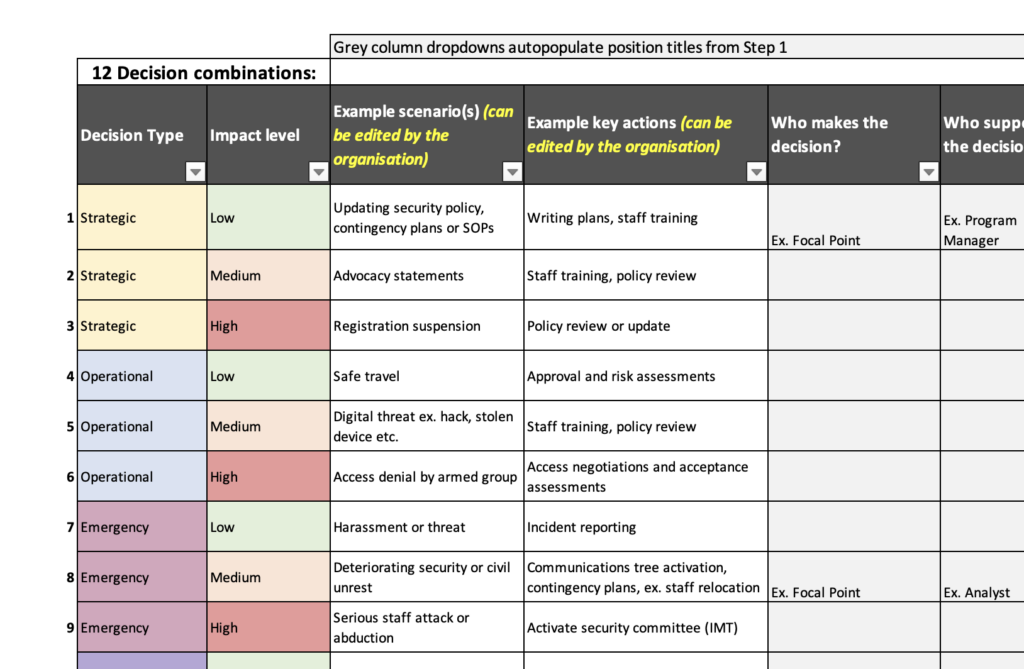
Step 2 allows you to determine types of security scenarios that require decisions, and key actions to be taken. Who makes the decision is automatically populated based on step 1.
Section B can used by staff who want to know who makes a decision in a given scenario – and can be used to support security training or before a decision is made.
Disclaimer
This tool is for internal use only and once completed with employee names should be stored securely and only shared with staff or trusted partners. This excel uses autopopulate features, changing the structure of tables in any part will impact its functionality. Organisations are encouraged to only edit what text is identified as editable.